


How to build a voice-based custom LLM pipeline that works for any language and gives more accurate responses with fewer hallucinations
When I watched the Hume AI demo, I tested it for Indian languages,it got the emotion levels correct, but the output was gibberish in a few cases. I then tested the same with ChatGPT using voice mode, it worked for some questions and did not for some (eg: Fig 1).
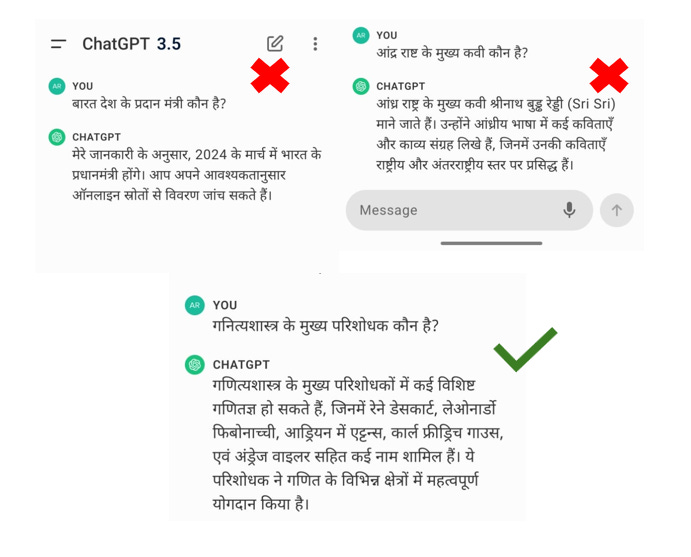
I then tested translating the speech into English language and the responses were more accurate and with fewer hallucinations. To automate this process, I started building a pipeline that translates any language to English and answers the user question in the same source language. This pipeline can be used in a voice-based RAG system, where user questions are queried on a custom knowledge base.
This article explains the main elements and code required to build this pipeline. Most of the components used here are open-source models (except for the GPT 3.5 turbo model used as LLM) making it easy to replicate. This article assumes you understand the terms large language model (LLM), Retrieval Augment Generation (RAG), RAG frameworks like Llama-index, and Vector database (like Qdrant) and their functionality.
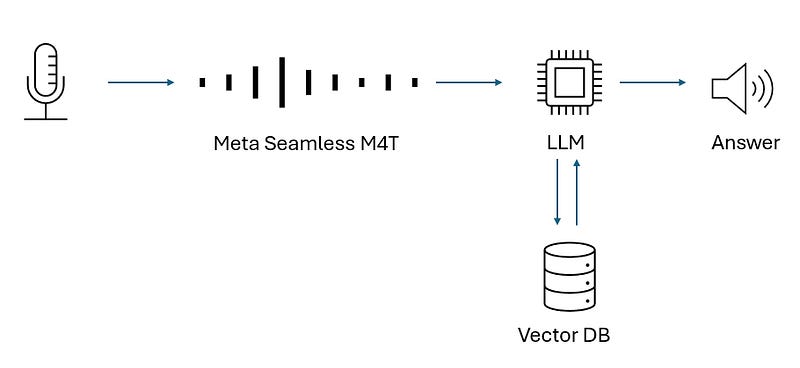
TL; DR version: The input is a speech recording, which is sent to the Seamless M4T model for accurate translation to English. Once translated it is sent to LLM answering the question asked. The response is converted to audio of the source language and played to the user. The entire process can be considered as a 3 step process.
Step 1: Pre-process the recording into specific dimensions for speech translation to work. Send the request to translate the recording using M4T models and identify the source language using Whisper models.
Step 2: Send the translation to query on the knowledge base (a vector database) to retrieve the required information and then send the text to LLM to answer the question.
Step 3: Translate the answer to the source language and play the audio output to the user.
Let's start building……….
Translating the speech using Seamless M4T models
The first element of the pipeline is translating the question into English. This is done because LLM response accuracy is higher when the language is English. To translate the speech into English, we use Meta’s Seamless M4T.
The first step is to convert the sample rate to 16000 Hz using the librosa library as Seamless M4T models are trained on a sample rate of 16000 Hz.
import librosa

def adjust_speed_librosa(audio_path, output_path, speed_factor):
    y, sr = librosa.load(audio_path, sr=None)
    y_fast = librosa.effects.time_stretch(y,rate= speed_factor)
    sf.write(output_path, y_fast, sr)
Then we send the resampled recording file for translation. We set up a Python application using fastapi to host the m4t model on a GPU using the script m4t_app.py (shared at the end of the article) and this application can process our requests.
Seamless M4T being multimodal, can convert text to speech or text, and similarly speech to speech or text. Source language is required as input for text translations, for speech translations it is not required. For this article, we will focus on speech as input.
def send_file_for_translation(input_data, mode, tgt_lang, src_lang):
    if mode == "t2st" or mode == "t2tt":  # text to speech translation or text to text translation
        data = {
            'input_data': input_data,  # this is the text input
            'mode': mode,
            'tgt_lang': tgt_lang,
            'src_lang': src_lang
        }
        response = requests.post(API_URL, data=data)

    else:  # mode == "s2tt" for speech to text translation
        with open(input_data, 'rb') as f:  # here input_data is the file path
            files = {'file': (input_data, f, 'audio/wav')}
            data = {
                'mode': mode,
                'tgt_lang': tgt_lang,
                'src_lang': src_lang
            }
            response = requests.post(API_URL, files=files, data=data)
    response_json = response.json()  # Parse the JSON response
    if mode in ["s2tt", "t2tt"]:
        return response_json.get('translated_text', None)
    elif mode == "t2st":
        return response_json.get('audio_link', None)
Behind the scenes, when the request is sent, first the seamless m4t model is used to translate the text. In the later steps of the process, we convert the output to speech, which requires the source language. Seamless M4T does not have built-in source language detection. We use OpenAI’s Whisper model to get the source language (why not use the Whisper model for both translation and source language detection, story for another time). Both the translated content and the source language are sent back as the response.
async def translate_audio(file: UploadFile = File(None),
                          input_data: str = Form(None),
                          mode: str = Form(...),
                          tgt_lang: str = Form(...),
                          src_lang: str = Form(None),
                         model:str = Form(None)):

    if mode == "s2tt" and file:  # speech to text translation and file is provided
        temp_file = _save_temp_file(await file.read())
        input_path = temp_file
    elif mode == "t2st" and input_data:  # text to speech translation and text is provided
        input_path = input_data
    elif mode == "t2tt" and input_data:
        input_path = input_data
    else:
        raise ValueError("Invalid mode or input not provided!")

    # Set up arguments for m4t_predict
    output_filename = "output_t2st.wav"
    if mode in ['t2st','s2tt']:
        if mode == "t2st":
            output_filename = "output_t2st.wav"
        elif mode == "s2tt":
            output_filename = f"output_{file.filename}"
        args = Namespace(
            input=input_path,
            task=mode,
            tgt_lang=tgt_lang,
            src_lang=src_lang,
            output_path=os.path.join(UPLOAD_DIR, output_filename),
            model_name="seamlessM4T_large",
            vocoder_name="vocoder_36langs",
            ngram_filtering=False)
    else:
        args = Namespace(
            input=input_path,
            task=mode,
            tgt_lang=tgt_lang,
            src_lang=src_lang,
            model_name="seamlessM4T_large",
            vocoder_name="vocoder_36langs",
            ngram_filtering=False)


    # Call the prediction function
    translated_text = m4t_predict(args)

    if (mode == "s2tt"):
        model_w = whisper.load_model("large")

        audio = whisper.load_audio(input_path)
        audio = whisper.pad_or_trim(audio)

        # make log-Mel spectrogram and move to the same device as the model
        mel = whisper.log_mel_spectrogram(audio).to(model_w.device)
        # detect the spoken language
        _, probs = model_w.detect_language(mel)
        print(f"Detected language: {max(probs, key=probs.get)}")
        src_lang = {max(probs, key=probs.get)}
        if file:
            os.remove(temp_file)

        return {"translated_text": translated_text,
                'src_lang' :src_lang}
    elif mode == 't2tt':
        if file:
            os.remove(temp_file)
        return {"translated_text": translated_text}
        # Use translated_text
    else:  # mode == "t2st"
        print(f"./{os.path.basename(args.output_path)}")
        return {"audio_link": f"./{os.path.basename(args.output_path)}"}  # Use args.output_path
Use RAG to add information to answer the translated question
Once we translate it to text, the next step is to send the question to an LLM along with the required information. This can be achieved by setting up a RAG system using frameworks like Llama-Index, Langchain, or even the OpenAI assistants. Retrieval Augmented Generation (RAG) system is a framework that combines LLMs with a private knowledge base and queries the required information for a specific input/question. I have used Llama-index using the Qdrant vector database adding text data related to a business. The translated question is sent as text input. Llama-index calculates the cosine similarity of the vectors, ranks the vectors, and sends the top k nodes to the LLM to answer the question.
def get_llm_response(question):
    count = 3
    mode = 'compact'
    async_mode=False
    llm_predictor = LLMPredictor(AzureChatOpenAI (deployment_name='gpt-35-turbo',model='gpt-3.5-turbo',
                                             temperature=0,max_tokens=256,
                                             openai_api_key=openai.api_key,openai_api_base=openai.api_base,
                                             openai_api_type=openai.api_type,openai_api_version='2023-05-15',
                                             ))
    embeddings = LangchainEmbedding(OpenAIEmbeddings( deployment="text-embedding-ada-002",model="text-embedding-ada-002",
                                                    openai_api_base=openai.api_base,openai_api_key=openai.api_key,
                                                    openai_api_type=openai.api_type,openai_api_version=openai.api_version),
                                    embed_batch_size=1,)
    service_context = ServiceContext.from_defaults(llm_predictor=llm_predictor,embed_model=embeddings)

    client = qdrant_client.QdrantClient(url=f"{hostname}:6333")
    vector_store = QdrantVectorStore(client=client, collection_name=f"collection_name")
    index = VectorStoreIndex.from_vector_store(vector_store=vector_store,service_context=service_context)
    response_synthesizer = get_response_synthesizer(response_mode=mode, use_async=async_mode,service_context=service_context, text_qa_template = SYSTEM_MESSAGE)
    query_engine = index.as_query_engine(response_synthesizer=response_synthesizer,similarity_top_k=count))
    response = query_engine.query(question)
    return response.response
Convert the text to speech using Google text to speech synthesizer
The last part of the pipeline is converting the text answer from the LLM to speech. The answer in English from the previous step (a text output) is sent to the translation model to convert it into source language text (Another way to achieve this is to add instructions to the LLM to answer it in the source language). We can skip this step if the source language is English.
We use Google’s gTTS library, which can convert text to speech when the language is specified. We use the source language detected (by OpenAI's Whisper model) and convert the text into speech, which is played to the user.
def text_to_audio(text, lang=gtts_lang_input):
    """Converts given text to audio and plays it."""
    tts = gTTS(text=text, lang=lang, slow=False)
    tts.save("output_audio.mp3")
    return ipd.Audio("output_audio.mp3")
Things to consider while deploying this pipeline
We now have a complete pipeline where users can ask a question and we can answer the question in the same source language. Few things to consider here in the pipeline:
Both Seamless M4T and Whisper models are available in different sizes. The accuracy of the model and the time required to process the input changes based on the size of the model selected. So, a lot of experiments are required based on the use case.
gTTS was used instead of M4T for text-to-speech because the speech output from the model, as it required post-processing. gTTS model’s output was clear and did not require further processing.
Seamless M4T is multi-modal, it can work for S2ST, S2TT, T2ST, and T2TT, so we need to mention the input type for the model. It can translate 100 languages and it’s an open-source model.
This article is based on Seamless M4T models (released in Aug 2023), since I have drafted this article (and not published for a long time), Meta has released the V2 model, which has similar functionality but improved accuracy.
The code is based on older versions of llama-index and OpenAI. Both packages have had major breaking changes since then. I’ve included the versions in the requirements file.
I’ve shared all the code I’ve used in this git repo